Blog
Row counter for knitting: clicker, paper or app?
Tally marks, a clicker or an app: how to count your rows without losing your place every time you put your knitting down.
A row counter tells you which row you're on, even after a break, a phone call or a good night's sleep. There are a few kinds: tally marks on paper, a clicker, a counter that sits on your needle, stitch markers, and apps. The best one mostly depends on how you knit: phone next to you or not, one count to keep or several at once.
Row 48 or row 52? You put your work down to answer the phone, pick it up ten minutes later… and have no idea where you were. Knitting or crocheting, everyone's been there.
Why count your rows?
Counting rows is what lets you follow a pattern without going wrong. It's also what gets you two sleeves the same length, and puts a cable or a decrease exactly where it belongs. On a simple project, you can get away without it for a while. As soon as there's a motif or two matching pieces, it becomes essential.
5 ways to count your rows
1. Tally marks on paper
One mark per row, on a scrap of paper or in pencil right on the pattern. It's simple, free and reliable, and plenty of experienced knitters have never used anything else. The catch: you need a pencil at hand for every row, and the paper tends to end up crumpled at the bottom of your project bag.
2. The clicker
A little gadget: one click per row, and the number goes up. It's quick and oddly satisfying. But it's easy to forget to click at the end of a row, or to click twice out of habit, and your count drifts without you noticing.
3. The counter that sits on your needle
Some counters slide onto your needle; others are a little numbered chain you move along as you go. Their plus: they stay with your knitting. The downsides: one count at a time, and some can slip or won't suit every needle.
4. Stitch markers
A marker or a bit of scrap yarn in another color, placed every 10 rows: it isn't a counter, it's a reference point added to your work. It won't tell you the exact row at a glance, but it's perfect for recounting quickly when in doubt. Lots of knitters use markers alongside another counter.
5. An app on your phone
A row counter app has nothing to lose or forget: it's on your phone, which is often already sitting next to your knitting. It also lets you keep several counters and set a row goal. The downsides: you need your phone within reach, and some apps make you unlock the screen at every row, which gets old fast.
The real headache: several counts at once
The hard part isn't counting, it's counting several things at the same time. The rows of the body and the rows of the cable pattern. The left sleeve and the right sleeve, knitted one after the other. Decreases every 6 rows while the motif repeats every 8.
With a single physical counter, you end up juggling the clicker, tally marks in the margin and your memory. That's usually where the count slips.
Side by side
| Paper | Clicker | Needle counter | Markers | App | |
|---|---|---|---|---|---|
| Price | Free | Inexpensive | Inexpensive | Inexpensive | Often free |
| Works without a phone | ✓ | ✓ | ✓ | ✓ | ✗ |
| Easy to forget or lose | Somewhat | Very | Rarely | Rarely | Rarely |
| Several counts | Possible, in columns | One per clicker | One only | ✗ | ✓ |
| Row goal | By hand | ✗ | ✗ | ✗ | Depends on the app |
| Exact row at a glance | ✓ | ✓ | ✓ | ✗ | ✓ |
I've lost count: how do I recount my rows?
Don't panic: your rows are written into the knitting itself, you just need to know how to read them.
- In stockinette, on the right side, each stitch looks like a little "V". Count the "V"s stacked in one column, from the bottom up: each "V" is one stitch from one row, so the number of "V"s in the column gives you the number of rows.
- In garter stitch, count the complete ridges (the little horizontal bumps) on one side only, without adding the ones on the other side: each one stands for two rows. Multiply by two, and don't count the cast-on as an extra row.
- With markers every 10 rows, you only need to recount the rows since the last marker.
In crochet, count your rows or rounds from the bottom. In the round, put a marker in the first stitch of the round and move it up at each new round: it's especially handy when working in a spiral, like an amigurumi, where the start of the round is hard to spot.
The row counter in Hanori
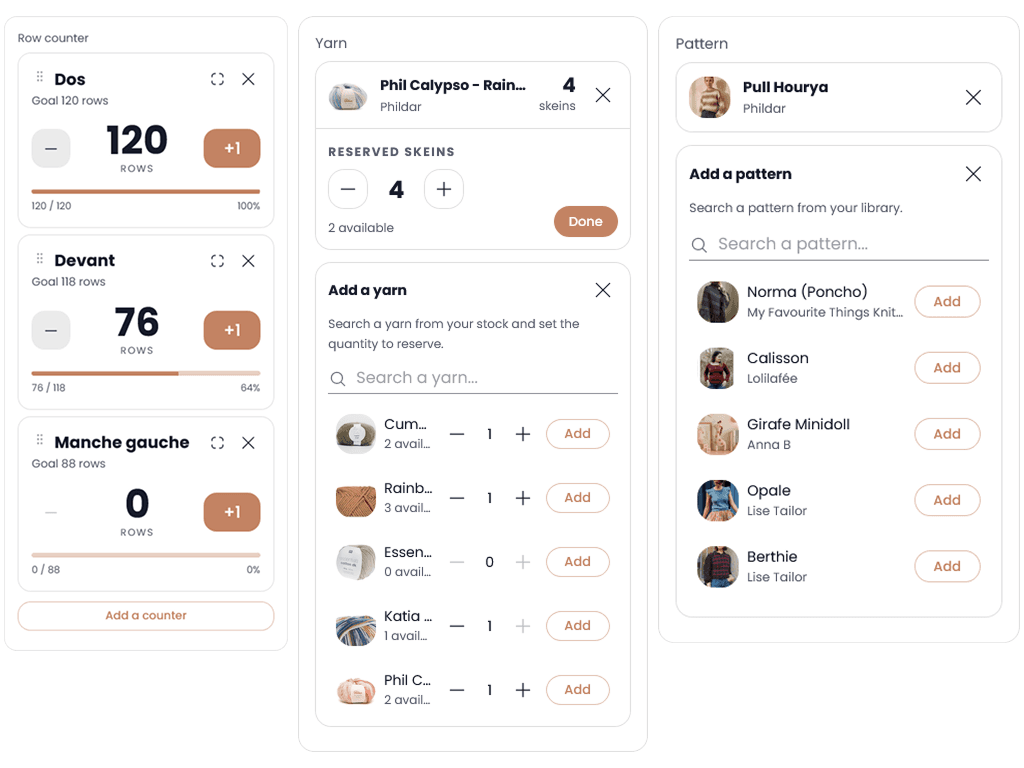
In Hanori, the row counter is part of your project, and it's free. You can create several counters per project and name them ("left sleeve", "cable pattern"), give them a row goal and see how far along you are as a percentage. You'll find them on your Home page and in your project list, so you can pick up exactly where you left off.
The "Expand" button shows the counter full screen, and your screen won't go to sleep: no need to unlock your phone at every row. Tap, knit, tap.
And since the counter lives in your project's page, alongside the pattern, the yarn and the needles, everything's in one place. I go into this in more detail in Knitting journal: paper or digital?.
Tips to stop losing count
- Note your row before every break, or lock your counter if it has a lock: breaks are usually where the count gets lost.
- Place a marker every 10 rows, even if you use another counter. When in doubt, you only recount the last few.
- Name your counters as soon as you have more than one: "row 12" means nothing three weeks later, "left sleeve, row 12" does.
- Set your row goal from the start: knowing you're on row 48 of 120 also tells you how many are left.
Frequently asked questions
Does the cast-on row count as a row?
Usually not: when knitting flat, the cast-on isn't counted as the first row. You start counting from the first row you actually knit. If in doubt, check your pattern's instructions.
How do I count rows in garter stitch?
Count the complete ridges on one side only, without adding the ones on the other side: each one equals two rows. Multiply by two to get your number of rows, without counting the cast-on.
Is there a free row counter app?
Yes, several. In Hanori, the row counter is free: several named counters per project, a row goal and a full-screen view that keeps your screen awake. It's part of a complete knitting & crochet notebook that's free to start.
What about crochet: how do I count rows and rounds?
Same idea: a counter, tally marks or an app. For pieces worked in the round, put a marker in the first stitch of the round and move it up at each new round, and use one counter per piece if you're making several, like the legs and body of an amigurumi.
The best counter is the one within reach
Paper, clicker, chain or phone: there's no perfect counter, just the one that's there when you put your knitting or crochet down. And nothing stops you from combining two.
So, how do you count your rows? Tell me on Instagram, @hanori.app 🧶